In 2026, hotels must meet high guest expectations for speed and convenience. Self-service kiosks powered by a strong PMS (Property Management System) help hotels streamline check-ins, reduce staff workload, and improve guest satisfaction. This guide shows hoteliers in India and beyond how to set up and optimize PMS for self-service kiosks, turning traditional lobbies into efficient, modern spaces.
Understanding PMS for Self-Service Kiosks
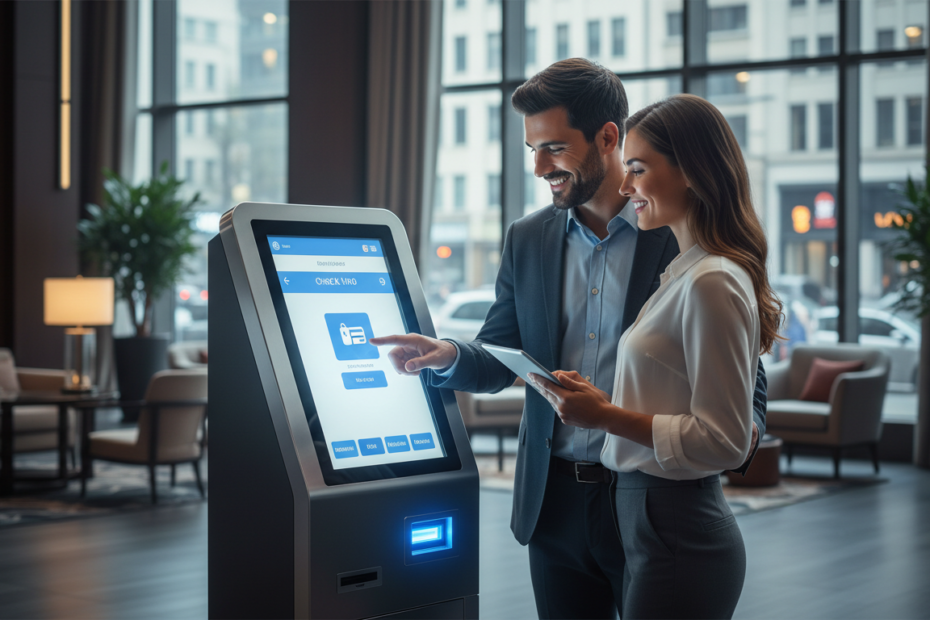
A PMS for Self-Service Kiosks connects your hotel’s property management system with user-friendly kiosks. This lets guests check in, receive keys, and manage their stay without waiting at the front desk. Many modern hotel PMS systems, like Aiosell, offer kiosk integration as a core feature.
As explained by hotel technology expert Priya Sharma,
“PMS-integrated kiosks are now essential for hotels aiming to deliver seamless, contactless experiences. They also reduce operational costs and improve accuracy.”
, Priya Sharma, Hospitality Technology Consultant
Choosing the right PMS is the first step toward modernizing your hotel’s guest journey.
Prerequisites and Materials Needed
Before setting up, you need a reliable hotel PMS system that supports kiosk integration. Check if your PMS vendor, like Aiosell, offers this feature. You also need self-service kiosk hardware, stable internet, and secure payment processing tools.
Other important steps include training your staff on using the new system and preparing digital room keys or keycard dispensers. Ensure you have support from your IT team or PMS vendor to handle technical questions during setup. A checklist can help keep your project on track.
Step-by-Step Setup Instructions
Choose a compatible PMS kiosk solution.
Set up the kiosk hardware in your hotel lobby.
Connect the kiosk to your PMS, following vendor instructions.
Configure payment, key issuance, and guest verification.
Test the full check-in process before going live.
Each step should involve close work with your PMS provider. As Rajiv Menon, a hotel operations manager, notes,
“Early collaboration with your PMS vendor ensures a smooth rollout and helps avoid costly surprises.”
, Rajiv Menon, Hotel Operations Manager
Be thorough with testing to catch issues before guests use the system.
Optimizing Guest Experience and Revenue
Once your property management system and kiosks are live, focus on guest experience. Use clear on-screen instructions and multi-language support. Enable upsell prompts for room upgrades or late check-out, increasing your hotels revenue with the next generation PMS.
Regularly analyze kiosk data to spot trends. If guests abandon check-in at certain steps, adjust the interface. As stated by Aiosell’s CEO,
“Continuous improvement, driven by real guest data, is what sets the best hotels apart when using PMS-powered kiosks.”
CEO, Aiosell
Use feedback to refine your process.
Troubleshooting and Support Tips
Even the best systems can face issues. Common problems include network outages, payment failures, or printer jams. Have a clear backup plan, such as a staffed desk during peak hours or a remote support hotline.
Train staff to help guests who run into trouble at the kiosk. Log all technical incidents and share them with your PMS provider. This helps improve both the hotel PMS system and the guest experience over time.
Best Practices for Long-Term Success
Schedule regular updates for both your PMS for Self-Service Kiosks and kiosk hardware. Review guest feedback monthly and update training for new staff. Make sure your kiosk is always clean, visible, and easy to use.
Keep up with industry trends and PMS software updates. New features can drive more revenue and higher guest ratings. Stay in touch with your PMS vendor and consider joining user groups to share tips with peers.
Conclusion
By linking a modern PMS kiosk with self-service kiosks, hotels can boost efficiency, guest satisfaction, and revenue. A clear setup plan, staff training, and regular system reviews ensure your investment delivers long-term value in the competitive hotel market.